


Ukulele by Yousician
4.4836.00 Reviews
App Specs
- Version
- 5.29.1
- Updated On
- License
- Free
- Downloads
- 1,000,000+
- Developer
- Yousician Ltd.
- Categories
- Education
- Platform
- Android
Screenshots


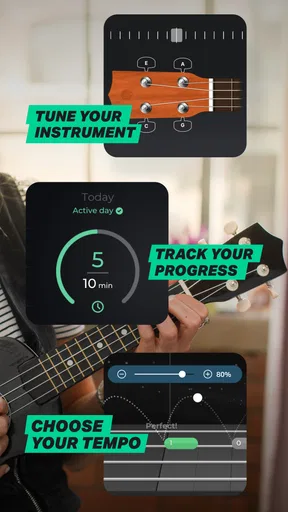
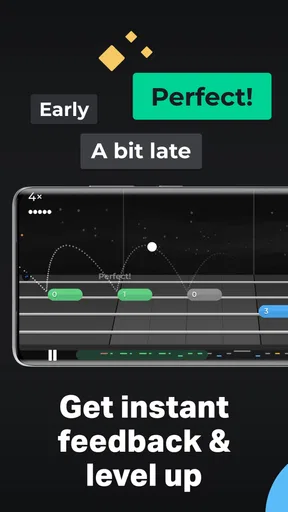




 Analysis by AppCompare
If you're anything like me, you’ve probably daydreamed about strumming a ukulele on a sunlit beach. Well, guess what? With the Ukulele by Yousician app, you can bring that dream a little closer to reality. This nifty app transforms your smartphone into a personal ukulele tutor, and I’ve been strumming along to its sweet tunes for a while now.
Who benefits most from learning this way?
I’d point a curious beginner toward this app if they want a clear first step rather than a pile of unrelated videos. A guided lesson format can make it easier to decide what to practice next, especially when you have only a few minutes and don’t yet know which chord or rhythm should come first. The ukulele is also a practical instrument for short practice sessions: you can pick it up, work through a small exercise, and put it away without needing a full rehearsal setup.
It can suit returning players, too, particularly someone who remembers a few chords but has lost the habit of playing. A structured prompt gives that person a reason to take the instrument out again. I would not treat the app as a complete substitute for a human teacher, though. A teacher can watch posture, notice tension, and adapt an explanation to the exact problem in front of them. The app is more useful when you want a convenient practice guide and are comfortable correcting some things by listening and observing your own hands.
Making a short practice session count
For an everyday routine, I’d keep the instrument within reach and set a modest goal before opening the lesson: review one chord change, keep a steady beat through a short passage, or revisit a song section that feels awkward. That gives the session a purpose instead of turning it into an open-ended scroll through activities. If I have ten spare minutes after work, a short, focused practice is more realistic than expecting myself to finish a long lesson sequence.
One useful habit is to separate learning a movement from playing it at speed. If a chord change feels clumsy, I’d slow down and repeat the hand movement without worrying about a score or a song. Then I’d try it in context. An app can encourage you to keep moving through a lesson, but a beginner sometimes improves more by pausing and repeating one small transition than by rushing to the next challenge.
What the microphone-based format asks of you
Because the app listens through the device microphone, your surroundings can affect how comfortable a session feels. A quiet corner is easier for focused practice than a busy room with conversation or a television in the background. You may also need to position the phone so it can hear your instrument while keeping the lesson visible. I’d try a couple of placements before settling into a routine; a stable stand or a nearby shelf can be more comfortable than holding the phone while playing.
This listening approach has a useful trade-off. Immediate responses can help you notice when your timing or notes need attention, but they are not the same as a complete musical assessment. A chord may sound acceptable to a listener while a device has trouble hearing it clearly, or the room may make feedback less consistent. If a result seems at odds with what you hear, I’d repeat the passage in a quieter spot and check the tuning and playing position before assuming the lesson itself is wrong.
Worth Reading Before You Choose

EA SPORTS FC Mobile 26 Is a Bigger Football Game, but It Takes Time

Flipboard Shows What News Apps Must Do Beyond the Feed

Switching to Android Auto Means Rethinking Your Driving Routine

Google Calendar Makes a Crowded Week Easier to Manage

Ludo King Makes the Most of the Minutes Between Plans

Baby Panda World Brings Quick Play to Modern Phones, but Its Game Library Feels Busy
There is also a difference between receiving a prompt and understanding why something went wrong. Feedback can point you toward a missed note or uneven rhythm, while a teacher or a detailed explanation may be better at diagnosing a tense wrist, an inefficient fingering choice, or a habit that causes discomfort. I’d use the app to guide repetition, not as a reason to push through pain or strain.
The First Strum
Getting started with Ukulele by Yousician is as simple as it gets. The app is available for both Android and iOS, making it accessible to almost everyone. You download it, open it up, and it immediately dives into an interactive tutorial. The app listens to your playing through your device’s microphone, which is pretty cool. It feels like the app is right there with you, guiding every strum and chord.
The interface is bright and inviting, with a playful vibe that fits the ukulele’s sunny personality. If you're a total newbie, the app starts with the basics, teaching you how to hold the instrument and strum the strings. For those who already know their way around a ukulele, there are plenty of advanced lessons to dive into.
Learning and Jamming
One of the most exciting features of the app is its structured lesson plan. It’s like having a teacher who’s available 24/7. The lessons are categorized by skill levels, so whether you’re an absolute beginner or a seasoned player, there’s something for everyone. The app uses a gamified approach, which I find super motivating. As you complete lessons and challenges, you earn points and unlock new songs. It’s like Guitar Hero, but with real instruments!
Another standout feature is the song library. The app boasts a wide array of songs, from classic hits to contemporary pop. You can filter the songs by difficulty, so you can start with easy tunes and gradually work your way up to more complex compositions. It’s incredibly satisfying to nail a song you’ve been practicing!
Readability, navigation, and pace
For me, the bright visual style makes the lessons feel approachable, but a lively screen is not automatically the easiest screen for every learner. If you prefer a calm presentation, the playful look and game-like rewards may feel busy rather than encouraging. I’d take a moment at the start of a session to make sure the lesson instructions are easy to follow from where the phone is placed, instead of trying to read while changing chords.
The app’s level-based structure is helpful when you want direction, yet it can also make practice feel like a sequence of tasks. I’d resist treating every challenge as a test. Repeating a section because it still feels uncertain is a sensible choice, even if you are eager to unlock more material. The best pace is the one that leaves you able to play the movement again later, without relying on the screen to remind you of every step.
Different hands, ears, and learning preferences
Ukulele practice combines small finger movements, listening, timing, and looking between the instrument and the device. That mix may work well for someone who enjoys learning by doing and can comfortably see the lesson while holding the instrument. If reading small on-screen details or shifting attention between the display and strings is tiring, a larger screen placed at eye level may help. I’d test the arrangement before committing to a long session, because a comfortable viewing angle matters as much as the lesson itself.
People learn music in different ways. Some want a visual sequence and immediate responses; others prefer to listen to a demonstration repeatedly, read chord diagrams, or work from printed material. This app’s interactive approach is appealing if you want to play along, but it may be less suitable if you need explanations in a different format or want to learn without relying on a microphone. In that case, a book, video lesson, or in-person tutor could be a better companion or alternative.
Small adjustments can make practice more manageable. I’d begin with short sessions, keep the instrument supported, and take a break if my fingers or wrist start to feel uncomfortable. New players can mistake soreness from unfamiliar movement for a signal to practice harder; I think it is wiser to stop, reset your posture, and return later. The app can structure a lesson, but it cannot decide how your body feels.
Personal Touch and Feedback
What sets Ukulele by Yousician apart is its personalized feedback system. As you play, the app listens and provides real-time feedback. It tells you if you’re hitting the right notes, if your timing is off, or if your strumming needs some work. This immediate feedback loop is invaluable because it helps you improve faster. Plus, it’s like having a teacher who doesn’t judge you for playing the same chord wrong for the fifth time in a row!
“The app's feedback system made me feel like I had a personal tutor in my pocket.”
That feedback is most useful when I treat it as a clue, not a final verdict. If the app flags a passage, I can isolate the chord change, listen to the sound myself, and retry it at a comfortable pace. This turns a broad “I’m not getting it” moment into a smaller question: is my fingering unclear, is my strum uneven, or am I changing chords too late? That kind of self-check makes guided practice more valuable than simply chasing a better score.
Choosing songs without getting stuck
Song choices can keep practice enjoyable, but an appealing tune is not always the right next exercise. I’d use the difficulty filter to find something within reach, then pay attention to the particular passage that challenges me. A song that uses familiar chords can still expose a timing problem, while a technically simple tune may be a good way to build confidence. It helps to alternate a song you enjoy with a lesson that targets a specific weakness, rather than expecting one activity to do both jobs.
If you are learning for a social occasion, such as joining a casual singalong, focus on steady rhythm and clean chord changes before worrying about playing every flourish. The app can help build the basic practice habit, but playing with other people adds the separate skill of keeping time while listening to them. I’d leave room for that kind of real-world practice, because a polished solo run is not quite the same as accompanying a group.
Community and Challenges
Another aspect worth highlighting is the community feature. You can connect with other ukulele enthusiasts, share tips, and even participate in challenges. These challenges are a fun way to test your skills against others and see how you stack up. Plus, it’s a great way to stay motivated and keep practicing!
For some learners, a challenge adds a welcome deadline; for others, comparison can make a personal hobby feel more pressured than it needs to be. I’d use community activities as optional encouragement, not as a measure of whether I’m progressing properly. If public participation is not your style, the lesson path and private practice can still be the main reasons to use the app.
The app also regularly updates its song library and lessons, so there’s always something new to learn and play. It keeps the experience fresh and exciting, which is crucial for maintaining interest over time.
Cost, compatibility, and practical limits
This is a free education app from Yousician Ltd., with in-app purchases ranging from $14.99 to $139.99 per item. I’d start by exploring the free experience and decide whether the lesson style fits my routine before spending anything. If you already know you prefer a human teacher or independent video tutorials, paying for additional app content may not be the best use of your learning budget.
It has an average rating of 4.4 from around 17,000 ratings, and more than a million installs. The app is rated for Everyone, was released on December 14, 2021, and its current version is 5.25.0, with Android 8.0 as the minimum operating system. Those details make it easier to check whether it suits your device and household, but they do not guarantee that every phone microphone or practice environment will produce an equally smooth experience.
Compared with free video lessons, this app’s main difference is the interactive practice loop: you play while it listens instead of only watching someone demonstrate. Videos can be easier when you want to pause, replay a particular hand position, or learn at your own pace without a microphone-based response. Printed chord charts are simpler still, but they leave more of the sequencing and self-correction to you. If you want real-time human correction, a ukulele teacher remains the stronger choice; if you want a guided, on-device routine, this app has a clearer advantage.
Final Strum
In a nutshell, Ukulele by Yousician is a fantastic app for anyone looking to learn or improve their ukulele skills. It’s user-friendly, engaging, and packed with features that make learning fun and effective. Whether you’re just starting your musical journey or looking to hone your existing skills, this app is a must-have.
So, if you’re ready to start strumming your way to ukulele greatness, head over to your app store and give it a whirl. Who knows? You might just become the next ukulele sensation on your block!
An inclusive choice, with sensible expectations
My recommendation is strongest for a beginner or returning player who wants structure, can practice where the phone can hear the instrument, and enjoys encouragement from visible progress. It is less compelling for someone who needs detailed one-to-one correction, dislikes game-like learning, or cannot comfortably divide attention between a screen and their hands. In those situations, an instructor, a carefully chosen video course, or a simple printed method may feel more natural.
I’d give it a try with a short lesson in a quiet, comfortable spot, then judge it by whether the instructions and feedback help you play more confidently—not by how quickly you move through challenges. The app makes ukulele practice feel approachable, but the most inclusive way to use it is to adapt the pace, setup, and expectations to your own needs. If that balance suits you, it can be a friendly way to bring regular playing into an ordinary day.
Pros
- User-friendly interface for beginners.
- Interactive lessons with real-time feedback.
- Wide range of songs to learn.
- Personalized learning paths available.
- Supports multiple playing techniques.
Cons
- Requires subscription for full access.
- Limited offline capabilities.
- Might feel repetitive for advanced users.
- Occasional app performance issues.
- Some users report tuning inaccuracy.
FAQs for Ukulele by Yousician
What is Ukulele by Yousician and how does it work?
Ukulele by Yousician is a comprehensive learning app designed to teach users how to play the ukulele. It offers interactive lessons, video tutorials, and real-time feedback. The app listens to you play and provides instant feedback to help you improve your skills. It’s suitable for beginners and advanced players alike.
Do I need prior experience to use Ukulele by Yousician?
No prior experience is necessary to use Ukulele by Yousician. The app caters to all skill levels, from complete beginners to advanced players. It offers a structured learning path that starts with the basics and gradually increases in complexity, allowing users to learn at their own pace.
Is Ukulele by Yousician free to use?
Ukulele by Yousician offers a free version with limited access to lessons and features. For more comprehensive access, including additional lessons and tools, a premium subscription is available. The premium version offers a more in-depth learning experience with no limitations on lesson access.
What devices are compatible with Ukulele by Yousician?
Ukulele by Yousician is available for both Android and iOS devices. It can be downloaded from the Google Play Store for Android users and the App Store for iOS users. The app is optimized for both smartphones and tablets, providing a seamless learning experience across devices.
How does Ukulele by Yousician provide feedback on my playing?
Ukulele by Yousician uses the microphone on your device to listen to your playing. As you play along with the lessons, the app analyzes your performance in real-time and provides instant feedback. This helps you identify areas of improvement and track your progress effectively.


